Breadcrumbs in a website is a method of allowing users to trace their surfing through website. They are an important navigational part of a website, essential for increasing your SEO rankings in Google.

In order to Set BreadCrumbs,
- Navigate to General Settings >> Bread Crumb.
- Toggle on the Enable Breadcrumb Trial option to enable the default Breadcrumbs.
- You can also select any of the available options in the Breadcrumb Types dropdown menu below
Your Breadcrumbs type will be effective if only you have given plugins activated.
- Click on Publish button at the top to save the changes.
Pro Features
In Yaatra Pro, you can further design your breadcrumbs by choosing the colors around it. You can choose background color and text color for your breadcrumbs.
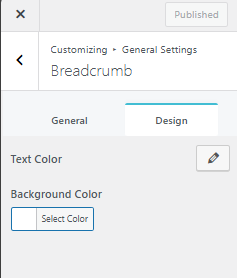
- Go to Design Tab to customize design for your Breadcrumbs
- Choose your text color by clicking on that pencil-like icon
- Do the same for Background Color by clicking on the palate below.