Imagine your website has extensive content. It would be inconvenient for visitors to scroll all the way back to the top. This is where the ‘Scroll Top’ feature comes in handy, improving the user experience by providing a quick way to return to the top of the page without manual scrolling.
Scroll Top is an indispensable feature of a site which is displayed as an arrow button on the bottom right-hand side of your screen that will be visible after you have scrolled your site to some depth.
Scroll Top button is enabled by default in Yaatra Blog theme, but you have a wish to disable or change its display button, follow the steps mentioned below:
In order to enable/disable/change Scroll Top button you’ll have to,
- Navigate to General Settings >> Scroll Top
- Then toggle Enable Scroll Top to either disable or enable it, if it already has been disabled.
- Click on the ‘Publish’ button to change the settings.
Pro Features
Yaatra Pro features enhanced designing options for your “Scroll Top” button bolster your user engagements and experiences.
- For starters, you can choose various types of styles for your scroll top button. Yaatra Pro offers 15 different types of stylish buttons to display.

- You can label the scroll top button by adding your label in the text field below the icons
- Adjust your sizes for your button by dragging sliders or manually adding the size.
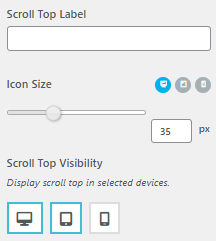
- You can also choose to visualize your button to various devices.
In this case, the Scroll Top Button can be seen for Desktop and Tablet, but it won’t be seen in Mobile devices
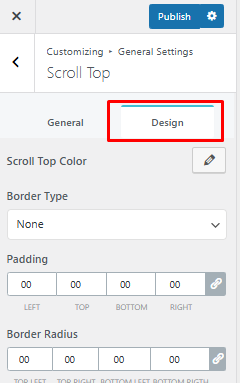
- After adjusting your button, you can further design it by going to Design tab beside the General tab
- Choose your colors for the Scroll Top button
- Select your Border Type from the drop-down menu
- Provide attributes for padding and radius of your button